Backups, artifacts and versions
Five notions overlap in everyday speech and mean different things here. Confusing them makes the interface incomprehensible; telling them apart makes it obvious.
The vocabulary
| Term | What it is |
|---|---|
| Run | one attempt to back up a device, at a given moment |
| Artifact | one backed-up object of a device: its running configuration, its startup configuration, its hardware inventory… |
| Lineage | the history of an artifact, identified by (device, key, transport) |
| Version | a dated state of an artifact, created only if the content changed |
| Snapshot | for binary artifacts, a dated and deduplicated Kopia deposit |
A successful run that finds nothing changed creates no version — but it is recorded as a successful run all the same. That distinction is what lets a report say “backed up, unchanged” rather than inflating the history of an artifact frozen for two years.
Two classes of artifact
| Class | Examples | Handling |
|---|---|---|
text |
network configurations | comparable line by line, kept in the database |
blob |
an F5's UCS archive, a Linux directory tree | deduplicated in a Kopia repository, not comparable line by line |
A text artifact is kept in the database, in full, as long as it does not
exceed BKP_INLINE_TEXT_MAX_BYTES (16 MiB by default). Beyond that, and with no
repository reference, the version is not created and the run fails with its
reason — an empty backup that looks successful is worse than an outright failure.
A blob artifact is never compared line by line. Its page points to the
snapshot, where you navigate, read and
compare file by file.
The BIG-IP master key
A BIG-IP encrypts the secrets inside its own configuration — monitor passwords, the LDAP/RADIUS bind account, SNMP communities, SSL key passphrases — under a master key that belongs to that unit, held in its Secure Vault. A UCS archive carries those secrets still encrypted under that key.
So a UCS restored onto a different appliance loads without a single error, and then the monitors fail to authenticate, the directory bind never comes up, and SSL keys with a passphrase refuse to load. The backup was good; it simply was not portable. That is the day you needed it most: an RMA, a rebuild, a cloned VE.
Collecting the key is a per-device collection option, f5_master_key, and it
is off by default. Both consequences are true at once, and the panel states them
side by side rather than offering a vague warning:
- Include the master key — this backup can be restored onto a different appliance. It also means the backup alone is enough to recover every secret in the configuration.
- Do not include it (default) — the backup restores only onto this unit. Its secrets stay unreadable anywhere else, including by anyone who obtains a copy of the backup.
The key is read with f5mku -K, over SSH or over iControl REST
(POST /mgmt/tm/util/bash). Both need an account with Administrator rights and
Advanced shell access, and the REST endpoint is frequently disabled by internal
policy. A refusal is a normal outcome, not a failure: the backup completes,
and the device page says the key was not collected and why. A refusal on that
endpoint is classed as a device refusal, not an authentication failure — the
account has just opened the session and saved the configuration, and counting it
against the credentials would eventually suspend the device from its backups.
Keys are kept side by side, never replaced. If the master key is reset on the unit, archives taken before the reset stay encrypted under the old one: a UCS is restored with the key of its own time. Each collected key is stored encrypted under the customer's key — so destroying the customer's key destroys these too — and the device page lists them by collection date.
Unlike device credentials, which never leave the platform (EF-24), a master key
exists in the platform only to be handed back to a human. It is revealed by
an explicit action, needs the key:export permission, and each reveal is logged
with who, when, which device and which version of the key.
Restoring a UCS onto another appliance
- On the device page, find the key collected at the same time as the archive you are about to restore, and reveal it.
- On the target appliance, install it and reboot as F5 requires:
f5mku -r <key>. - Load the UCS as usual:
tmsh load /sys ucs <archive>. - Check what the key was there for — monitors authenticating, the directory bind coming up, SSL keys with a passphrase loading. If those fail, the key installed was not the one contemporary with the archive.
The archive and the key are retrieved separately and deliberately: they are never packaged together, so that a copy of a backup handed to someone is not also a copy of every secret it protects.
PAN-OS: running-config and candidate-config
Palo Alto is the platform where the two collected artifacts deserve a word of their own, because their names mislead if you read them as “current” and “previous”.
| Artifact | What it holds |
|---|---|
running-config |
the configuration actually filtering traffic — the last committed state |
candidate-config |
the working configuration, including changes not yet committed |
The difference between the two therefore is the list of pending changes: an
address object created in the interface and left uncommitted appears in
candidate-config and not in running-config. Comparing the two on the same day
answers “what is waiting to be committed on this firewall”, which no other
artifact says.
For the operator the consequence is that a candidate-config alone is no proof
of what the firewall enforces, and a running-config alone hides work in
progress. Both are collected, and each is versioned in its own lineage.
Both are directly re-importable. The API returns them wrapped in an XML
response envelope (<response status="success"><result>…</result></response>);
that envelope is stripped at collection, so what is stored and downloaded is
the <config> element the device expects. Loading one back needs no manual
editing — see Restoring.
Lineages
An artifact carries the transport that produced it. The lineage is therefore
(device, artifact key, transport), not (device, key).
Two transports are never compared with each other. The same device renders a
different document depending on the path: on a FortiGate, the API renders the
equivalent of show — only what differs from the defaults, around 14,000 lines —
while SSH renders show full-configuration, every default spelled out, around
40,000 lines. Both restore correctly, but comparing them would produce a massive
and meaningless difference.
The practical consequence: switching a device's transport opens a fresh lineage instead of making the whole fleet appear modified overnight. The two lineages coexist on the device page, each with its own history.
If the entire fleet appears modified at once, it is almost always because a transport switched or a normalisation rule changed. The report's “fallback” column confirms it.
Normalisation
Without it, every run produces a difference and nobody reads the alerts after a week. Configurations contain timestamps, counters, checksums — and, on some platforms, secrets re-encrypted on every read.
Measured on a FortiGate: 582 lines of difference between two reads thirty
seconds apart, on a device where nothing had moved. ENC values, private-data
encryption key, base64 of the encrypted private keys: FortiOS applies a fresh
salt on every show.
What normalisation touches, and what it does not
It serves two purposes only:
- computing the fingerprint that detects changes;
- comparing two versions.
It never touches the text that is kept. The platform stores and returns the
text raw and complete: line endings unified, trailing spaces removed, nothing
else. A set passwd ENC … line is volatile for the fingerprint and
indispensable to restoring — excluding it from storage would produce a
FortiGate backup with no passwords at all.
That is the distinction to hold on to: what is compared is not what is kept.
Two forms of rule:
scrub— line patterns, applied one line at a time;scrub_blocks— (start, end) pairs that exclude a whole block, the case of encrypted private keys whose base64 changes entirely on every read. Certificates, by contrast, are stable and stay compared.
Each platform's rules are declared in its registry entry; see Writing a collector.
Transports and fallback
Every platform has two paths: an HTTPS API and an SSH/CLI access. A
device's transport_pref setting takes:
| Value | Behaviour |
|---|---|
auto |
tries the platform's preferred transport, then the other |
api |
API only, no fallback |
ssh |
SSH only, no fallback |
An explicit transport has no fallback: asking explicitly for SSH and being collected over the API would produce a different history lineage without the operator knowing.
When fallback happens, and when it does not
This is a structuring distinction:
| Situation | Effect |
|---|---|
| The transport cannot be established — port closed, API disabled, service absent | fallback to the other transport |
| The transport is established but a command fails | failure, no fallback |
| A fingerprint is not approved | failure, no fallback |
Replaying on the other transport a command that failed would give nothing better and would hide a genuine defect behind an apparently successful backup. And switching to SSH because a certificate is unknown would amount to working around the trust policy instead of applying it — see Device identity.
A fallback is logged and appears in the run report. A persistent fallback is an anomaly, not normal operation: it means the preferred path has been broken for a while.
Run statuses
| Status | Meaning |
|---|---|
pending |
queued, no agent has taken it yet |
running |
taken by an agent, in progress |
changed |
succeeded, at least one artifact modified — a version was created |
unchanged |
succeeded, no change — this is not an absence of run |
failed |
collection failure |
abandoned |
no agent took it within the allotted delay |
cancelled |
removed from the queue by an operator |
changed and unchanged are both successes. A device whose runs have all
been unchanged for six months is perfectly backed up; its configuration has
not moved.
abandoned points to an agent problem, not a device problem: nobody took the
job. Check that one of the customer's agents is online and authorised for that
device.
Triggering a backup
Interface: the Back up now button on a device page, or Back up the whole fleet on the device list.
Also via the API. One device, several, or a whole customer:
Answers# One or more devices curl -s -X POST "$BASE/api/backups/trigger?tenant=$CUSTOMER" \ -H "Authorization: Bearer $TOKEN" -H 'Content-Type: application/json' \ -d '{"device_ids":["<uuid>","<uuid>"]}' # The customer's whole fleet curl -s -X POST "$BASE/api/backups/trigger?tenant=$CUSTOMER" \ -H "Authorization: Bearer $TOKEN" -H 'Content-Type: application/json' \ -d '{"all_devices":true}' # The whole fleet of one given platform curl -s -X POST "$BASE/api/backups/trigger?tenant=$CUSTOMER" \ -H "Authorization: Bearer $TOKEN" -H 'Content-Type: application/json' \ -d '{"all_devices":true,"platform":"fortinet_fortios"}'202with the list of jobs created. A device that already has a pending job does not receive a second one: the response is shorter than the request.
Tracking and cancelling
The queue is visible on the dashboard. A manual job that no agent takes turns to failure after 45 seconds rather than staying queued indefinitely.
Also via the API.
# The latest runs, all devices
curl -s "$BASE/api/runs?tenant=$CUSTOMER&limit=50" -H "Authorization: Bearer $TOKEN"

# Failures only — the useful view in operation
curl -s "$BASE/api/runs?tenant=$CUSTOMER&failed_only=true" -H "Authorization: Bearer $TOKEN"

# One device's runs
curl -s "$BASE/api/runs?tenant=$CUSTOMER&device_id=$DEVICE" -H "Authorization: Bearer $TOKEN"

# Cancel a pending job
curl -s -X POST "$BASE/api/runs/$RUN/cancel?tenant=$CUSTOMER" -H "Authorization: Bearer $TOKEN"

# Clear all of a customer's pending manual jobs
curl -s -X POST "$BASE/api/runs/cancel-pending?tenant=$CUSTOMER" -H "Authorization: Bearer $TOKEN"
The Backups screen
Two views, which count different things.
The list is the history of changes: one row per artifact version, created only if the fingerprint moved. That is where you answer “what changed this month”.
The calendar counts runs — what an operator commonly calls “a backup”. In large type, the day's successful runs, with or without change; in small type, the failures and the modifications detected.
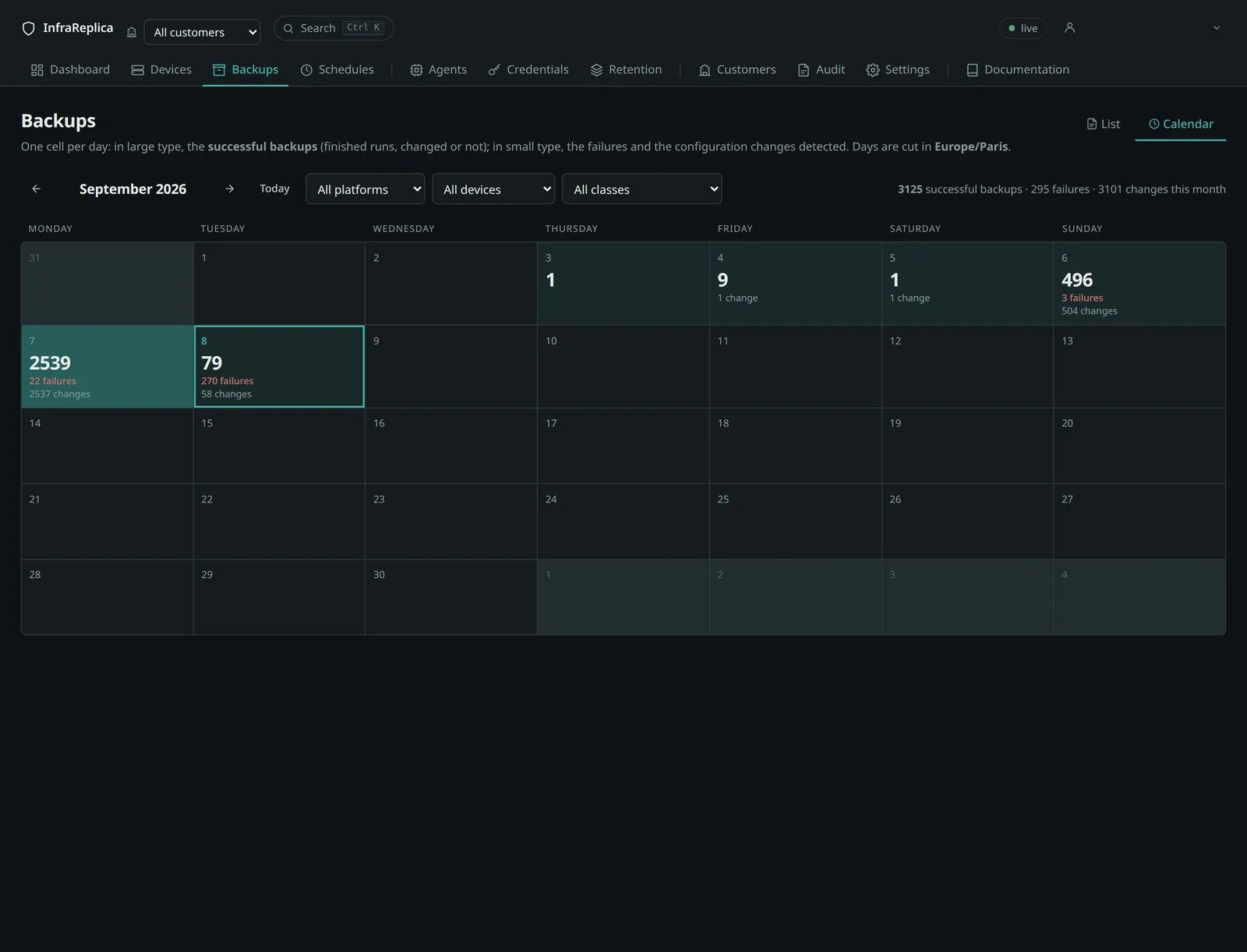
A cell's intensity follows the lines actually modified that day, not the number of versions: a comment fix and a policy overhaul must not give the same shade. Clicking a day opens its versions and all its runs.
Days are cut in the platform's display timezone (display_timezone setting,
Europe/Paris by default), never in UTC: a backup scheduled at 01:00 Paris time
falls at 23:00 UTC the day before, and counting in UTC would put it on the wrong
day for the whole team. List timestamps, by contrast, follow each person's
browser; the calendar has to be the same for everyone.
Reading a device's artifacts
Also via the API.
To read, compare and restore, see Restoring.