Retention and erasure
Cascade
A retention rule is set at three levels, from the most general to the most specific:
The most specific value that is set wins, field by field. A customer that sets only the age therefore leaves the number of versions to inherit from the global level: a partial rule does not replace what it does not define.
That is what lets you set a house policy at global level, override it for a customer whose contract demands it, and make an exception on a single device, without rewriting the other two levels.
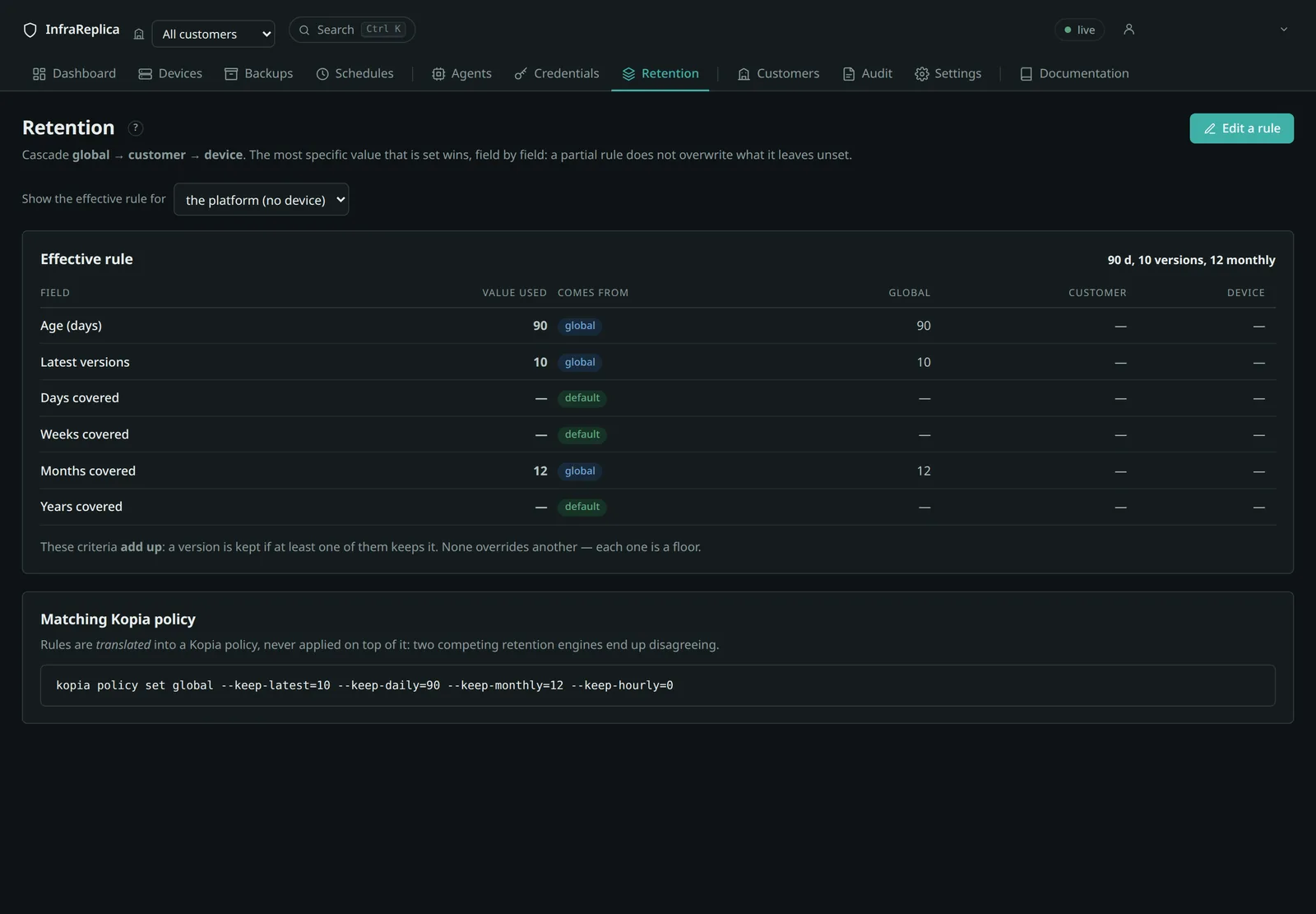
The screen displays the origin of each field — global, tenant or
device. It is the answer to the first question anyone asks in front of a
cascade: “why does this device keep 30 days when the customer is set to 90?”
The fields of a rule
| Field | Screen | Effect |
|---|---|---|
keep_days |
Age (days) | every version younger than this many days is kept |
keep_versions |
Latest versions | this many most recent versions, whatever their age |
keep_daily |
Days covered | one snapshot kept per day, over this many days |
keep_weekly |
Weeks covered | one snapshot kept per week, over this many weeks |
keep_monthly |
Months covered | one snapshot kept per month, over this many months |
keep_yearly |
Years covered | one snapshot kept per year, over this many years |
“Days covered” is not “backups per day”. keep_daily = 7 keeps one snapshot
per day over seven days, not seven snapshots each day. The screen labels say so
in those words, because the earlier wording — “daily”, “weekly” — reads both ways
and genuinely misled an operator.
These criteria add up. A version is kept if at least one of them keeps
it; none overrides another. Each is a floor, so keep_days = 30 together with
keep_monthly = 12 keeps everything from the last thirty days and one snapshot
per month for a year.
If the global level is itself empty, the platform falls back on 90 days and 10 versions.
Also via the API.
A field set to# Effective rule, with the origin of each field curl -s "$BASE/api/retention/effective?tenant=$CUSTOMER&device_id=$DEVICE" \ -H "Authorization: Bearer $TOKEN" # Set a rule at customer level curl -s -X PUT "$BASE/api/retention/tenant?tenant=$CUSTOMER" \ -H "Authorization: Bearer $TOKEN" -H 'Content-Type: application/json' \ -d '{"keep_days":90,"keep_versions":20,"keep_monthly":12}' # At device level curl -s -X PUT "$BASE/api/retention/device?tenant=$CUSTOMER&device_id=$DEVICE" \ -H "Authorization: Bearer $TOKEN" -H 'Content-Type: application/json' \ -d '{"keep_days":365}' # At global level curl -s -X PUT "$BASE/api/retention/global" \ -H "Authorization: Bearer $TOKEN" -H 'Content-Type: application/json' \ -d '{"keep_days":90,"keep_versions":10}'null— or absent — inherits from the level above. Requiresretention:write.
Translation into a repository policy
The resolved rule is translated into a policy for the deduplication engine; it is never applied on top of it: two competing retention engines end up diverging. The screen displays the matching command.
The engine reasons in number of snapshots kept per period, never in absolute duration. A retention expressed in days is therefore translated into a number of daily snapshots — equivalent as long as the schedule is daily. The discrepancy is displayed rather than hidden: on a device backed up every hour, “30 days” does not keep 30 days.
Object lock
Independently of business retentions, the storage applies an object lock with
a floor duration (object_lock_days, 30 days by default).
For that duration, no identity can delete an object — not even a platform administrator. This is the protection against ransomware and against operational error.
The lock is deliberately decoupled from business retentions. A lock aligned on a year would forbid reclaiming any space for a year; too short a lock would bring nothing. Thirty days is a compromise, and adjustable.
The consequence to know about
Lowering a retention does not free space immediately. Expired objects stay locked until their lock falls due. That is the answer to “why is the disk not freeing up after I lowered the retention?”
It is also why the capacity estimate distinguishes the raw volume from the steady state: between the two lies at least the duration of the lock.
Two layers of immutability
| Layer | Mechanism |
|---|---|
| Agent permissions | customers' service accounts hold no delete permission at all |
| Storage | object lock, governance mode |
A compromised agent therefore cannot erase what it wrote yesterday, even if it tries. The purge runs from the platform, under a distinct identity that is never present on an agent.
Maintenance
It is maintenance that actually applies retentions and reclaims the space that can be reclaimed.
backup maintenance                  # all customers
backup maintenance --tenant acme    # one customer
backup maintenance --full           # includes repository compaction
Retention of a decommissioned device
Removing a device from the inventory does not destroy its backups. They are kept
for decommissioned_retention_days — 365 days by default — then purged
automatically.
The operation is reversible throughout that delay: Put back in service cancels the scheduled purge.
A retention rule specific to a device travels with it in exports: without that, a re-import would silently bring it back to its customer's retention.
Crypto-shredding
When a customer asks for its data to be deleted, two requirements collide:
- it wants its data destroyed now;
- the object lock forbids that for its floor duration.
Destroying the key resolves the contradiction. Each customer has its own repository key; destroying it makes the whole of its backups unreadable on the spot, including for the provider. Space is released when the technical deadline passes.
That stands up contractually as it does in front of an auditor: the data is unrecoverable at the moment you announce it.
See Customers for the full sequence and what it demands.
Settings that can be changed live
These settings are changed from Settings, with no restart:
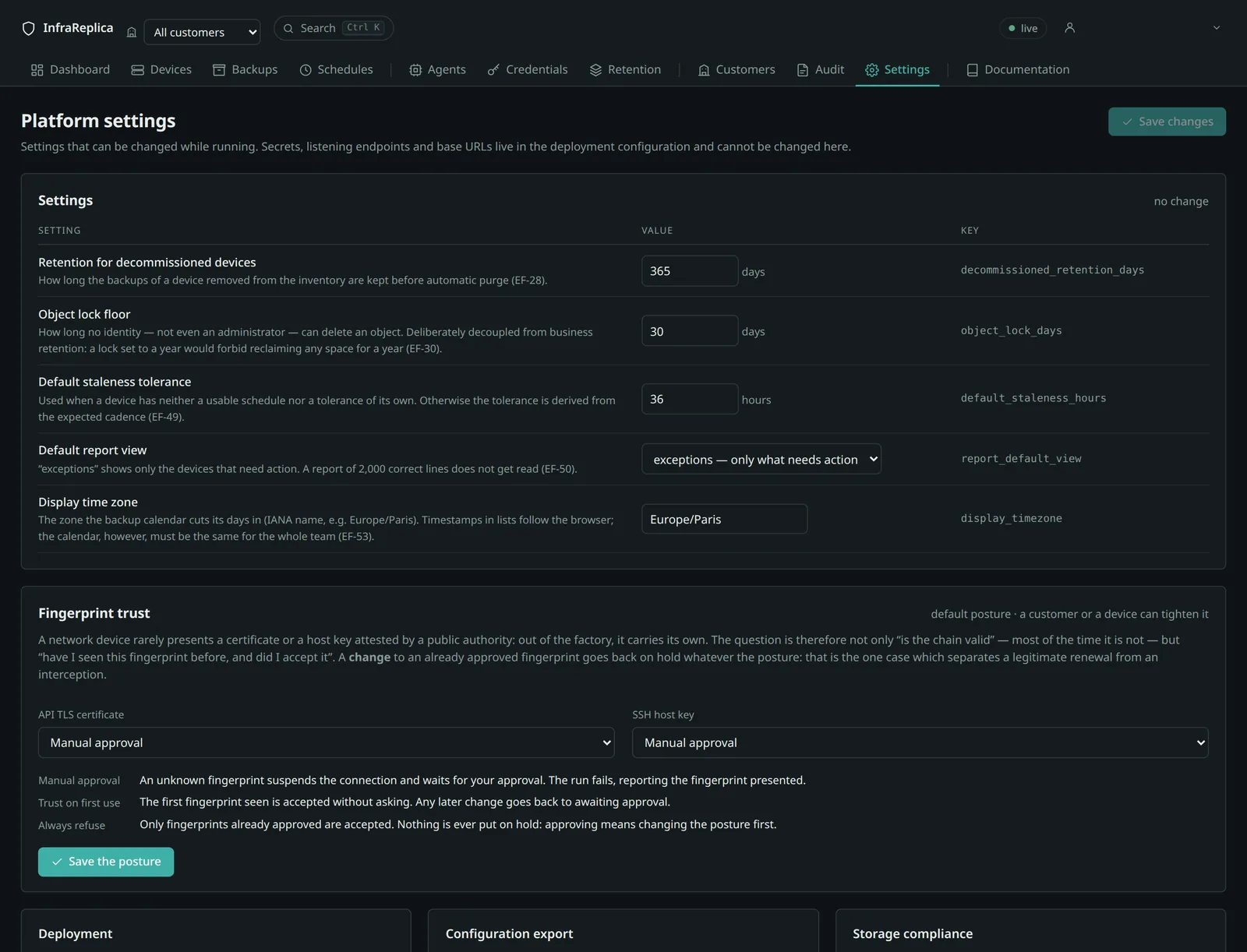
| Setting | Default | Effect |
|---|---|---|
decommissioned_retention_days |
365 d | how long backups are kept after a device is decommissioned |
object_lock_days |
30 d | floor duration of the lock |
default_staleness_hours |
36 h | tolerance when none can be deduced |
report_default_view |
exceptions |
default view for reports |
display_timezone |
Europe/Paris |
timezone the calendar is cut in |
tenant_purge_after_days (45 days) must stay greater than
object_lock_days, or purges would fail every time. The platform says so when a
customer is withdrawn if that is not the case.
Also via the API.
Changing a setting requirescurl -s "$BASE/api/settings" -H "Authorization: Bearer $TOKEN" curl -s -X PUT "$BASE/api/settings/object_lock_days" \ -H "Authorization: Bearer $TOKEN" -H 'Content-Type: application/json' \ -d '{"value":30}'tenant:manage.