Devices and credentials
The inventory is strictly declarative: the platform discovers nothing on its own. A device missing from the inventory is not backed up, and that shows — an automatic discovery would instead produce a fleet nobody knows to be complete.
Credentials
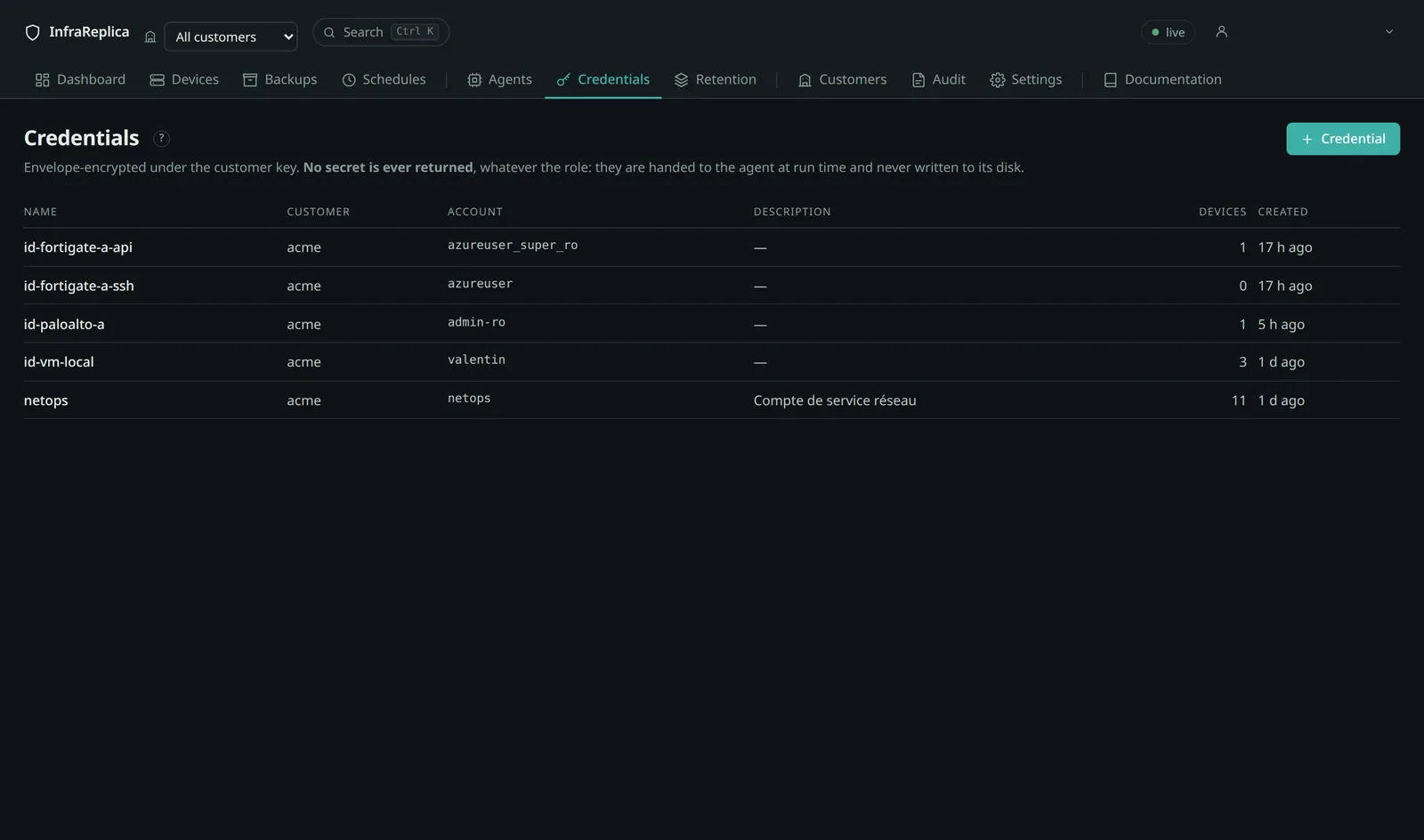
A credential is a set of secrets attached to a customer. It is declared once and reused by as many devices as needed.
| Field | Used by |
|---|---|
Account (username) |
SSH, and some APIs |
| Password | SSH, API with basic authentication |
| Enable secret | Cisco privileged mode (enable) |
| API token | FortiOS, PAN-OS, iControl |
| SSH private key | SSH and rsync, preferable to a password |
No secret is ever returned by the platform, whatever the role. The credentials screen lets you create them and see where they are used, never read them back. They are encrypted under the customer key and handed to the agent when a job runs — they are never written to its disk.
Interface: Credentials → + Credential.
Also via the API.
Requirescurl -s -X POST "$BASE/api/credentials?tenant=$CUSTOMER" \ -H "Authorization: Bearer $TOKEN" -H 'Content-Type: application/json' \ -d '{"name":"netops-read-only","username":"netops","password":"…", "description":"Network service account, read only"}'credential:write. The response contains no secret.
Read-only accounts, and the one platform where they do not work
A read-only account is enough on most platforms. The platform does not push configurations back to devices; granting write permissions gains nothing and widens the exposure if the account is compromised.
Two features do need more than reading, and both are opt-in. A BIG-IP's ucs
archive is created and then deleted on the device, so its account must be allowed
to save and remove files. And restoring a Junos configuration to its
device — off by default — needs an
account that can configure and commit. Where neither is used, read-only remains
the right answer.
PAN-OS is the exception, and it is a trap. Palo Alto replaces every password
hash with asterisks as soon as the exporting account is not a full
superuser — the superuser (read-only) role is enough to trigger the purge.
The backup is still readable and comparable, but importing it fails at commit:
This config has been sanitized of password data because it was exported by
a non-superuser. Please use a non-sanitized config.
Established on a real device. This is the worst case for a backup platform: a document that looks complete, versioned and dated, and is unusable on the day it is needed.
Use a dedicated superuser account for PAN-OS, with its own API key, distinct from the ones your engineers use. The tension between least privilege and restorability cannot be resolved on this platform: you have to choose, and a backup that does not restore is not a backup. A separate account at least keeps the key revocable without disturbing anyone's access.
The collector detects the purge, logs it and records it in the artifact metadata, with the accounts concerned — so the finding accompanies the backup rather than surfacing during a restore.
One credential per access path
A device carries a default credential and, optionally, one specific to each transport.
The common case — both paths share the same account — needs nothing more. But as soon as the two paths do not authenticate the same way, two are needed: a FortiGate reads its API with a token and its SSH with a password. With a single slot, the automatic fallback set off with the wrong credentials and failed to authenticate — so the fallback could never succeed on those devices.
The selectors are in the device configuration panel, under “Credential for the … transport”, with “— same credential as the default —” to restore inheritance.
Every attempt — including after a fallback — sets off with the account of the path it takes.
Also via the API.
Sendingcurl -s -X PATCH "$BASE/api/devices/$DEVICE?tenant=$CUSTOMER" \ -H "Authorization: Bearer $TOKEN" -H 'Content-Type: application/json' \ -d '{"credential_api_id":"<uuid-token>","credential_ssh_id":"<uuid-password>"}'nullon either field restores inheritance of the default credential.
The credentials offered are always those of the device's customer. The API explicitly refuses a credential belonging to another customer, rather than ignoring it silently: believing you attached an account that was not attached is worse than getting a refusal.
Declaring a device
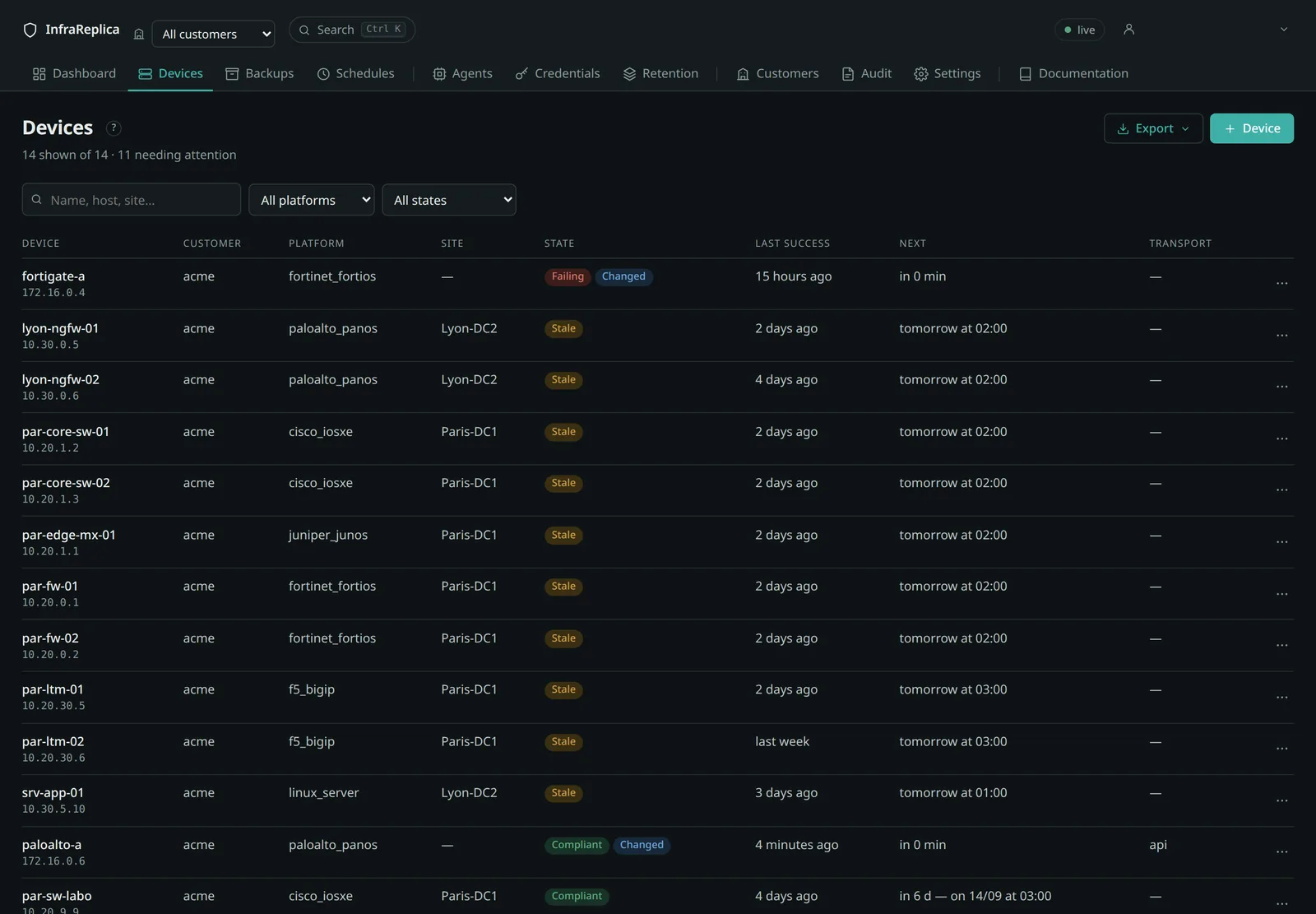
Interface: Devices → + Device.
Declaring a device and editing one use the same form, in the same sections and with the same labels — what you can set later, you can set right away. Beyond Schedule, the sections are folded when you declare: a device is created by filling the first three, and the rest opens when you need it.
| Section | What it holds |
|---|---|
| Device | customer (fixed afterwards), name, address or hostname, platform, site, tags |
| Access | transport (auto, api or ssh — see Transports), the default credential and, if needed, one per access path, API and SSH ports |
| Schedule | five-field cron expression (empty = on demand) with its preview, staleness tolerance, authorised agents |
| Security | TLS verification and certificate pinning, fingerprint trust posture |
| On failure | retry, restoring to this device (beta) |
| Collection | artifacts to collect, the platform's own options, and an advanced JSON box for what no field covers |
| State | backups enabled — editing only: a device is declared enabled |
The name must be unique within the customer; it is what an import matches on. The platform decides the collector, the artifacts and the normalisation, and it locks itself as soon as the device has a history: changing it would make that history incomparable.
Also via the API.
curl -s -X POST "$BASE/api/devices?tenant=$CUSTOMER" \
  -H "Authorization: Bearer $TOKEN" -H 'Content-Type: application/json' \
  -d '{"name":"par-core-sw-01","hostname":"10.20.1.2","platform":"cisco_iosxe",
       "transport_pref":"auto","schedule":"0 2 * * *","site":"Paris-DC1",
       "credential_id":"<uuid>","agent_ids":[],"tags":["production"]}'
Supported platforms
| Platform | Identifier | Transports | Preferred | Artifacts |
|---|---|---|---|---|
| Cisco IOS / IOS-XE | cisco_iosxe |
api, ssh | ssh | running-config, startup-config, inventory, version |
| Cisco NX-OS | cisco_nxos |
api, ssh | ssh | running-config, startup-config, version |
| Fortinet FortiOS | fortinet_fortios |
api, ssh | api | full-configuration |
| Palo Alto PAN-OS | paloalto_panos |
api, ssh | api | running-config, candidate-config, device-state (archive) |
| Cisco Meraki | cisco_meraki |
api | api | network, appliance, wireless, switch |
| Palo Alto Panorama | paloalto_panorama |
api | api | running-config, candidate-config |
| F5 BIG-IP | f5_bigip |
api, ssh | api | scf, ucs (archive) |
| Juniper Junos | juniper_junos |
api (NETCONF, port 830), ssh | api | configuration-set, configuration-conf, configuration-xml |
| Linux server | linux_server |
ssh | ssh | filetree (directory tree) |
Not every artifact is reachable over both paths. PAN-OS's candidate-config and
its device-state archive are only available through the API. This is not a
failure; the artifact is merely absent from the SSH lineage.
An F5's ucs archive is collected over both paths. Over SSH it is created with
save sys ucs, fetched by SCP, then deleted from the device. When the account or
the device refuses either step, the run keeps the scf export and reports the
missing archive separately: a BIG-IP that cannot produce a UCS is still backed
up. The built-in root account is handled specially — it lands in a system shell
rather than in tmsh.
Adding a platform: see Writing a collector.
Collection options
Some platforms need an extra parameter. Each of the options below has its own field in the device form, under Collection for what belongs to the platform, under Access and Security for what belongs to the access path. The “Advanced options (JSON)” box, folded at the bottom of Collection, is only there for what no field covers — and what you write in it lands in its field as soon as you leave the box.
| Option | Platform | Effect |
|---|---|---|
paths |
Linux | mandatory — paths to back up |
excludes |
Linux | exclusion patterns |
sudo |
Linux | the agent uses sudo rsync on the remote side |
vdom |
FortiOS | VDOM context to enter before reading |
vsys |
PAN-OS | virtual system targeted |
artifacts |
all | which artifacts to collect, when the default set is not what you want |
meraki_org_id |
Meraki | organisation the network belongs to |
meraki_network_id |
Meraki | mandatory — the network to back up |
api_port |
all | API port if different from the platform default |
ssh_port |
all | SSH port if different from 22 |
verify_tls |
all | false disables certificate verification |
tls_fingerprint |
all | SHA-256 fingerprint of the pinned certificate |
f5_master_key |
F5 BIG-IP | true also collects the unit's master key — off by default, read the two sides first |
Without vdom you silently read the configuration of the user's current
VDOM, not the one you think you are reading.
Options are replaced wholesale, never merged: sending only the exclusions would erase the paths. That is deliberate — a silent merge would make it impossible to remove an exclusion.
Importing a fleet
From a CSV
Recognised columns:
name, hostname, platform, transport, site, schedule,
credential, agents, tags, paths, excludes, vdom, vsys
Lists (agents, tags, paths, excludes) are separated by semicolons,
which leaves the comma to the CSV separator. Unknown columns are ignored with a
warning.
Also via the API.
From NetBox
curl -s -X POST "$BASE/api/inventory/import/netbox?tenant=$CUSTOMER&url=https://netbox.example&token=…" \
  -H "Authorization: Bearer $TOKEN"
From a platform export
curl -s -X POST "$BASE/api/inventory/import/json?tenant=$CUSTOMER&dry_run=true" \
  -H "Authorization: Bearer $TOKEN" -H 'Content-Type: application/json' \
  -d @export.json
Matching is on (customer, name) in all three cases: re-importing a
corrected file updates what exists instead of duplicating it.
A device whose credential still exists attaches itself — exports cite credentials and agents by name, not by UUID, precisely so they survive a database rebuild or a transfer to another instance. If a name is missing, the device is created without that attachment and the gap is reported in the response; create the object and re-import.
Use dry_run=true first: the response says what would be created, updated and
rejected, without writing anything.
Backing up Panorama
Panorama is the console that drives a fleet of Palo Alto firewalls. Its configuration holds what exists nowhere else: device groups and their policies, templates and their stacks, the list of managed devices. Losing a Panorama with no backup means losing the organisation of a whole fleet, even though every firewall keeps running what was last pushed to it.
Declare it as paloalto_panorama, over the API, with a superuser account —
same reason as for a firewall: a lesser account receives a configuration whose
password hashes have been replaced by asterisks, and that configuration will not
load back.
Two things a Panorama does not have, both measured against a real 12.1.9 instance:
- No device-state archive.
category=device-stateanswers “Device parameter needed” — on Panorama that category exports the state of a managed firewall, not its own. - No configuration bundle over the API. The GUI operation Export Panorama and devices config bundle has no API equivalent; the list of accepted export categories does not contain it. Its configuration is the backup, and it is enough.
Meraki discovery
Meraki is the one platform here whose configuration does not live on the
hardware. A switch downloads its settings from the cloud when it boots; there is
no SSH, no show running-config, and no file to export. The only source of
truth is the Dashboard API, and a backup is a document the platform
assembles by walking a collection of REST endpoints.
Two consequences.
One device, one network. Not one organisation, not one box. A network is where configuration actually exists, and it is the granularity an operator reasons in. A four-box branch office is one device on the platform.
No agent is needed. Every other platform requires an agent close to the equipment, because the address to reach is private. Meraki is reached over the public internet, so the platform scans it directly.
Fleets
A Meraki account is not declared device by device. It is declared once, as a fleet: a permanent object holding the API key, the organisations kept, and the devices that came out of it. Interface: Devices → + Device, platform Cisco Meraki — the form turns into a fleet scan. There is no permanent “fleets” tab: you come back to a fleet from any device that belongs to it, or from Devices → Meraki fleets once one exists.
A fleet is not a wizard. Reopen it whenever the account changes: what is already in the platform is ticked, the rest is not, and Rescan refreshes the picture from Meraki. Adding the access point installed last month is one tick.
The agent and the schedule chosen when the fleet is created are handed to every device it imports. Without an agent no backup is ever picked up, and without a schedule nothing runs on its own — so both are asked for up front rather than discovered on the first night.
Ticking imports. Unticking retires from service — it never deletes. The backups of a retired device stay readable and expire under the decommissioned-device retention. Deleting for good remains a separate, explicit action: a box unticked by accident must not destroy history.
Nothing is ever created on its own. A fleet that grew by itself would mean scheduled backups nobody asked for — and, since licensing counts devices, an automatic import would push a customer across a pricing tier without a decision.
Also via the API.
# Declare the fleet
FLEET=$(curl -s -X POST "$BASE/api/discovery/fleets?tenant=$CUSTOMER" \
  -H "Authorization: Bearer $TOKEN" -H 'Content-Type: application/json' \
  -d '{"name":"Meraki - Acme","credential_id":"<uuid>"}' | jq -r .id)

# Scan it (returns immediately; it runs in the background)
curl -s -X POST "$BASE/api/discovery/fleets/$FLEET/scan?tenant=$CUSTOMER" \
  -H "Authorization: Bearer $TOKEN"

# Read its current state: proposals, and what is already in the platform
curl -s "$BASE/api/discovery/fleets/$FLEET?tenant=$CUSTOMER" \
  -H "Authorization: Bearer $TOKEN" | jq '.last_scan.results[] | {key, kind, existing}'

# Align the inventory on a selection
curl -s -X POST "$BASE/api/discovery/fleets/$FLEET/apply?tenant=$CUSTOMER" \
  -H "Authorization: Bearer $TOKEN" -H 'Content-Type: application/json' \
  -d '{"keys":["L_669910444571384225","QBSB-MYVH-J9DE"]}'
One network, one device — and one device per box
A Meraki network is a site, not an IP subnet. It carries what the hardware of that site shares: VLANs, firewall rules, SSIDs, group policies, alerts.
Each box carries what belongs to it alone. Measured on a real organisation:
| Box | Its own configuration | What it is |
|---|---|---|
| MX100 | 1 505 B | WAN uplink settings, management interface |
| MS250-24 | 24 144 B | of which 23 660 B for its ports |
| MR52 | 602 B | radio channel, width, transmit power |
| MV12W | 705 B | video quality, retention, detection |
Neither can be derived from the other, so both are backed up, and both appear in a scan. Restoring one camera is two or three calls; restoring a whole site is dozens.
What a read-only key cannot back up
Meraki masks secrets it will not show to the key that asks. A read-only key
receives "psk": "*************" instead of a wireless pre-shared key: the
backup looks complete, compares without noise, and cannot restore that SSID.
The platform counts masked values while collecting and says so in the run log.
It is the same trap as PAN-OS, which sanitises password hashes when the exporting account is not a full superuser. If restorability matters, the key must be allowed to read what it is backing up.
Restoring
There is no “import configuration” endpoint. Restoring means replaying the write calls, in order — VLANs before the firewall rules that reference them. The platform hands you the saved document; it pushes nothing to a Meraki network. The one exception to that rule elsewhere in the platform is Junos-only, and does not apply here.
Editing a device
The configuration panel is reachable from the device page. Every field can be edited, with two exceptions.
The customer does not change. It determines the encryption key and the repository: moving a device would leave its history in a repository it no longer belongs to.
The platform stops being editable as soon as history exists. It decides the collector, the artifact keys and therefore the lineage; changing it would make the history incomparable without anything saying so. On a device with no history, the field stays editable.
Also via the API. The update is partial: an absent field is left untouched, which lets a form present a schedule alone without erasing the options along the way.
Testing the connection
The Test the connection button on the device page takes exactly the same path as a backup: same queue, same agent, same transport order, same credentials — and stops before collection. It therefore fails where the backup would fail, and for the same reason.
That is what makes it a usable diagnosis rather than a ping. An account can
authenticate without holding any read permission; the test sees that, a ping
does not.
Also via the API.
Answerscurl -s -X POST "$BASE/api/devices/$DEVICE/test?tenant=$CUSTOMER" \ -H "Authorization: Bearer $TOKEN"202with the job created, or409if no agent of the customer is online — in which case the test would sit queued and never run.
Decommissioning a device
Decommissioning a device suspends its scheduling and plans the purge of its
backups once decommissioned_retention_days expires (365 days by default).
The operation is reversible until then: Put back in service cancels the
purge.
Disabling is lighter: clearing “Enabled” suspends backups without planning any purge and without removing the device from the inventory.
Also via the API.
Exporting the inventory
Three scopes for devices, two for customers:
curl -H "Authorization: Bearer $TOKEN" "$BASE/api/devices/$DEVICE/export"
curl -H "Authorization: Bearer $TOKEN" "$BASE/api/devices/export?tenant=$CUSTOMER"
curl -H "Authorization: Bearer $TOKEN" "$BASE/api/devices/export"            # all customers
curl -H "Authorization: Bearer $TOKEN" "$BASE/api/tenants/$CUSTOMER/export"
curl -H "Authorization: Bearer $TOKEN" "$BASE/api/tenants/export?with_devices=true"
?format=csv on device exports. The same buttons exist in the interface, on a
device page, the device list, a customer page and the customer list.
No secret ever leaves: no password, no enable secret, no API token, no SSH
key, no repository key. An inventory export travels by email and lands in a Git
repository; it must not amount to a compromise. The export does list the
credentials it references (credentials_referenced), so you know before
re-importing what must exist on the target instance.