Reading, comparing, restoring
The principle: the platform provides the file
Restoring consists of making the file available. By default no configuration is ever sent back to a device.
This is not a missing feature, it is a security measure. The accounts used on devices need no write permission; the platform is not allowed to change a firewall or a router, and can therefore send nothing back to one — neither by mistake, nor under somebody else's control if it were compromised. It is an engineer who re-applies the configuration, knowingly.
One exception exists, and it is off everywhere until someone turns it on: a Junos native configuration can be applied back to its device. It is described in Restoring to a device below. Everything else on this page — every other platform, every other artifact, snapshot browsing, downloads — is read-only and stays read-only.
Every reading is logged, exactly like a download: it is reading a customer's configuration that constitutes the access, not the act of saving a copy of it.
Reading a configuration
An artifact screen carries three tools on the same page.
The reader
The most recent version is displayed under the version table.
- Line numbers switch on from a checkbox, and the choice is remembered from one visit to the next. They are rendered unselectable: a copy-and-paste does not carry them off.
- The Copy button copies the entire content, even when the screen shows only a preview, and reports a failure instead of doing nothing — the browser clipboard is only reachable in a secure context, and a fallback takes over under plain HTTP.
- A search field filters the lines.
Beyond 500 lines, only a preview is rendered and a button loads the rest. A FortiGate configuration runs to 40,000 lines and 1.4 MB: including all of it in every display made the page unusable for skimming. The full load goes through the API and is therefore logged as the reading it is.
Also via the API.
The content returned is the raw text of the backup, as it would be restored — not the normalised text used for comparisons.# A version's text curl -s "$BASE/api/artifacts/versions/$VERSION/content?tenant=$CUSTOMER" \ -H "Authorization: Bearer $TOKEN" # Download it as a file (requires “config:download”) curl -s -OJ "$BASE/api/artifacts/versions/$VERSION/content?download=true&tenant=$CUSTOMER" \ -H "Authorization: Bearer $TOKEN"
Comparing two versions
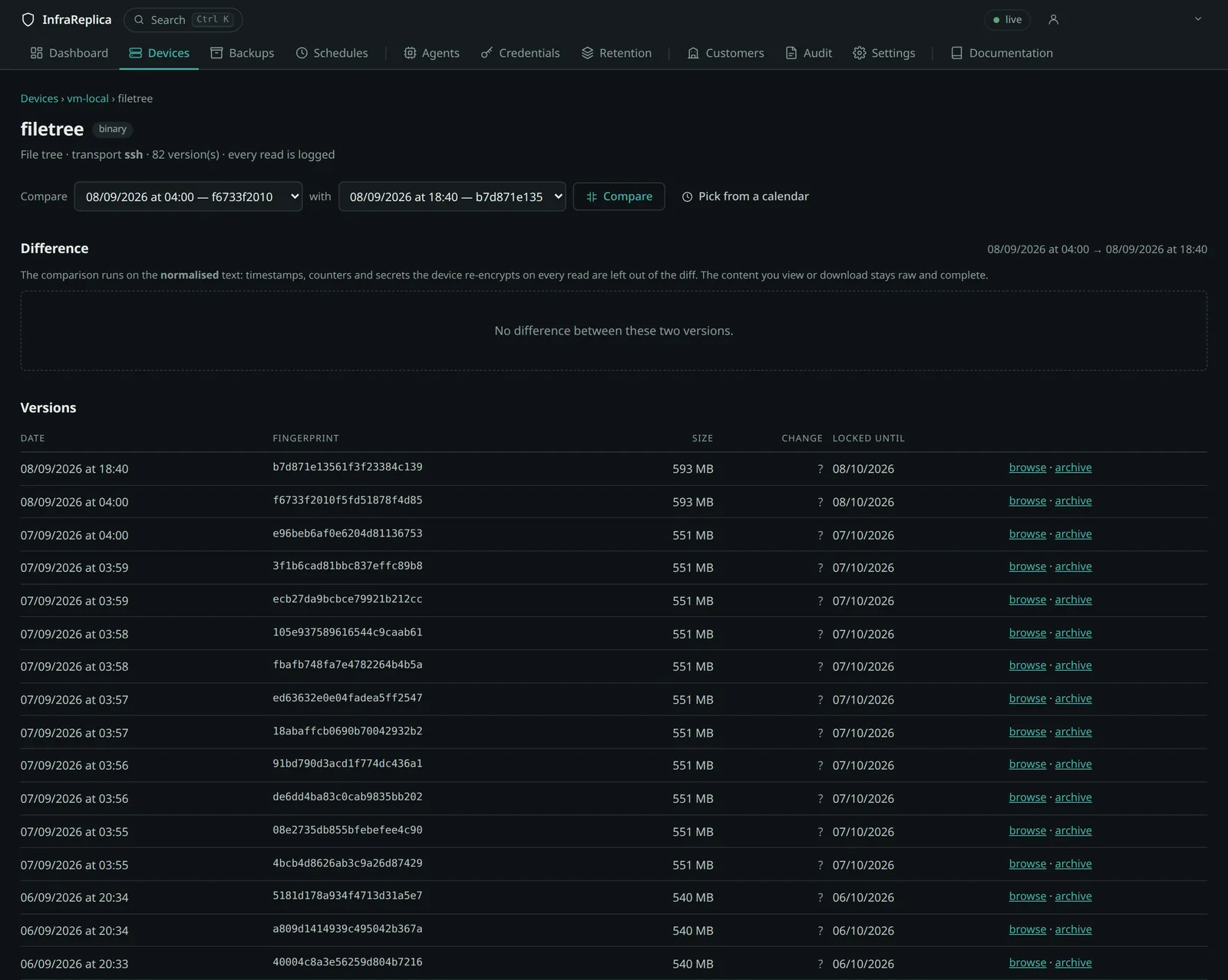
Two mechanisms coexist; take your pick.
The drop-down lists offer every version with its date and its fingerprint. That is the direct path when you know which versions to compare.
The calendar answers the question put the other way round: clicking a date holds its version; if there are several that day, they are offered with their time and their fingerprint. A selector says whether the chosen date feeds the left-hand version or the right-hand one.
A cell's intensity follows the number of lines touched, not the number of versions.
Also via the API.
Thecurl -s -G "$BASE/api/artifacts/$ARTIFACT/diff" \ --data-urlencode "from=$VERSION_A" \ --data-urlencode "to=$VERSION_B" \ --data-urlencode "tenant=$CUSTOMER" \ -H "Authorization: Bearer $TOKEN"contextparameter (3 by default, 0 to 20) sets the number of context lines. Both versions must belong to the same artifact, hence to the same lineage: the API refuses with400otherwise.
The comparison works on the normalised text. Versions are kept raw, but two secrets merely re-encrypted by the device are not a change — showing them as one would make every difference unreadable. See Normalisation.
Configurations rendered on a single line
Some platforms return a configuration with no line breaks at all: a PAN-OS
running-config is one long XML document. Compared as is, it yields a single
removed line and a single added line, which says nothing about what changed.
Such documents are therefore laid out before comparison, one element per line, so that a difference reads as a difference. The layout is a display concern only: the stored and downloaded text stays exactly what the device produced, and remains re-importable without any editing.
Re-importing on PAN-OS
A PAN-OS backup — running-config as much as candidate-config — is loaded back
onto the firewall without any manual preparation. The XML response envelope the
API wraps around the document is stripped at collection, so the downloaded
file is the <config> element the device expects.
- Device → Setup → Operations → Import named configuration snapshot, and send the downloaded file.
- Load named configuration snapshot, and select the file just imported.
- Commit.
Loading places the document in the candidate configuration; nothing filters traffic until the commit. That is the intended order: it leaves an opportunity to compare the loaded state against what is running before making it effective.
The one thing that can defeat this is a backup taken through a non-superuser account, whose password hashes PAN-OS replaces with asterisks — the commit then refuses the file. See read-only accounts.
Restoring to a device (beta)
A Junos configuration can be applied back to the device it came from. This is the only operation in the platform that changes what a device is running, it is disabled by default, and it is in beta.
What actually happens. The platform does not connect to anything: it queues a
job, and the customer's own agent carries it out, as for a backup. The agent
opens an SSH session, uploads the saved configuration to /var/tmp, and applies
it with load override — which replaces the running configuration in full,
rather than merging into it. The commit is issued as commit confirmed: if
nobody confirms it within the rollback window, the device reverts on its own to
the configuration it had before. Confirming is a second, deliberate action, taken
from the device page once you have checked the device and can still reach it. A
backup is queued right after a confirmation, so the history shows what is really
running.
Turning it on. Three levels, each of which can refuse what the one above allows, and all three closed to start with:
- Platform — Settings → Restore to a device. The top switch.
- Customer — a customer's restore policy. Empty inherits the platform.
- Device — the device's configuration panel. Empty inherits the customer.
Only after all three allow it does the button appear on an artifact screen, and
only for a configuration-conf artifact collected over SSH on a Juniper Junos
device. The set format is refused on purpose: it adds to the configuration in
place instead of replacing it, and would leave the device in a state that never
existed anywhere. The API answers 403 with the level that refuses, rather than
a bare “forbidden”.
Restoring needs the config:restore permission, which no read-only or operator
role carries.
Also via the API.
# Apply a version back to its device — the phrase is required
curl -s -X POST "$BASE/api/artifacts/versions/$VERSION/restore?tenant=$CUSTOMER" \
  -H "Authorization: Bearer $TOKEN" -H 'Content-Type: application/json' \
  -d '{"confirm": "LOAD OVERRIDE"}'

# Confirm the commit for good — otherwise the device reverts on its own
curl -s -X POST "$BASE/api/devices/$DEVICE/restore/confirm?tenant=$CUSTOMER" \
  -H "Authorization: Bearer $TOKEN"

# What is allowed for this device, and which level decided it
curl -s "$BASE/api/restore/effective?device_id=$DEVICE" \
  -H "Authorization: Bearer $TOKEN"
Why it exists at all, given the rule above. The rule was written for a
platform that only reads, and it remains the right default: an engineer who
re-applies a configuration by hand sees what they are doing. But an operator who
holds the backup, the credentials and the agent already has every means to push
the file; doing it through the platform at least makes it logged, rate-limited to
one job per device, and rollback-protected by commit confirmed. That is the
trade, and it is why the feature is opt-in three times over rather than simply
present.
The largest differences
The ranking answers “between which versions was there a lot of change”, a question a list of dates does not settle.
It covers the transitions between successive versions of one lineage, and also reads on a device page, all lineages taken together. The magnitude is measured in lines added and removed, on the normalised text, and recorded at the moment the version is written.
Versions written before this mechanism was put in place carry an unknown magnitude — never zero, which would make them look like non-changes. The screen says so and offers to catch them up, in batches.
Also via the API.
# Ranking for one lineage
curl -s "$BASE/api/artifacts/$ARTIFACT/divergence?tenant=$CUSTOMER" \
  -H "Authorization: Bearer $TOKEN"

# Ranking for one device, all lineages taken together
curl -s "$BASE/api/devices/$DEVICE/divergence?tenant=$CUSTOMER" \
  -H "Authorization: Bearer $TOKEN"

# Catch up the missing magnitudes, in batches
curl -s -X POST "$BASE/api/artifacts/$ARTIFACT/divergence/recompute?tenant=$CUSTOMER" \
  -H "Authorization: Bearer $TOKEN"
Browsing a snapshot
A blob artifact — a Linux directory tree, an F5's UCS archive — is not
comparable line by line. Its page therefore points to the snapshot, where you
can:
- navigate the tree, with a clickable breadcrumb;
- read a text file, or download it;
- compare a file at the same path between two snapshots of the same device —
which is what answers “what changed in
/etcsince last week?”; - download a
tar.gzarchive of the whole snapshot or of a subfolder.
Sizes are converted (kB, MB, GB); the exact value in bytes stays readable on hover.
Also via the API.
# A device's snapshots
curl -s "$BASE/api/devices/$DEVICE/snapshots?tenant=$CUSTOMER" \
  -H "Authorization: Bearer $TOKEN"

# Browse a folder
curl -s -G "$BASE/api/snapshots/$SNAPSHOT/browse" \
  --data-urlencode "path=/etc" --data-urlencode "tenant=$CUSTOMER" \
  -H "Authorization: Bearer $TOKEN"

# Read a file
curl -s -G "$BASE/api/snapshots/$SNAPSHOT/file" \
  --data-urlencode "path=/etc/hosts" --data-urlencode "tenant=$CUSTOMER" \
  -H "Authorization: Bearer $TOKEN"

# Compare the same path between two snapshots
curl -s -G "$BASE/api/snapshots/$SNAPSHOT/diff" \
  --data-urlencode "other=$OTHER_SNAPSHOT" \
  --data-urlencode "path=/etc/nginx/nginx.conf" \
  --data-urlencode "tenant=$CUSTOMER" \
  -H "Authorization: Bearer $TOKEN"

# Archive of a subfolder (requires “config:download”)
curl -s -OJ -G "$BASE/api/snapshots/$SNAPSHOT/archive" \
  --data-urlencode "path=/etc" --data-urlencode "tenant=$CUSTOMER" \
  -H "Authorization: Bearer $TOKEN"
The two snapshots compared must cover the same device: comparing the trees of two different servers would produce a massive and meaningless difference.
Size limits
Four limits, deliberate, and distinct from one another:
| Limit | Default | Setting |
|---|---|---|
| Preview of a file in the page | 2 MiB | BKP_MAX_FILE_PREVIEW_BYTES |
| File accepted for comparison | 5 MiB | BKP_MAX_DIFF_FILE_BYTES |
| Difference lines rendered | 5,000 | BKP_MAX_DIFF_LINES |
| Archive produced on the fly | 2 GiB | BKP_MAX_ARCHIVE_BYTES |
The comparison limit applies to each file read back, not to the difference produced: comparing two 5 MB files is reasonable, displaying a single 5 MB one in a page is not. The messages explicitly distinguish “preview limit” from “comparison limit”, and give the size in readable units.
Beyond the line ceiling, the difference displayed is truncated and the note offers to download both versions. The counters of additions and removals, for their part, cover the entire difference.
Beyond that, the request is refused with its reason rather than failing half-way through. Downloading through a browser is not the right mechanism for restoring several tens of gigabytes; a suitable mechanism is still to be defined.
Differences are computed server-side, never in the browser.
The platform embeds the deduplication binary for these reads. Backup data, by contrast, never passes through it: it goes from the agent to the object store.
Migrating a customer to another instance
Three distinct elements:
| What | How |
|---|---|
| The definitions | export of the customer and its devices — with no secret at all |
| The backups in clear | tar.gz archives per snapshot, content of the text versions |
| The encrypted repository | copy of the tenants/<slug>-…/ prefix, unreadable without its key |
Credential values have to be re-entered: they come out of no export, and that is what lets an export circulate freely. Transferring repository keys is a separate, dual-control procedure, which is not implemented yet.