Getting started
This document takes you from a bare machine to a first real backup. It assumes
Docker and docker compose are available; nothing else.
What to understand before starting
The platform is made of three pieces that do not live in the same place:
| Piece | Where it runs | What it does |
|---|---|---|
| The platform | at the provider | inventory, scheduling, interface, reports |
| The object store | at the provider | receives backups, locks them |
| The agents | inside each customer's network | reach devices, collect, deposit |
Backup data never passes through the platform: an agent collects, then deposits straight into the object store. The platform only ever sees jobs and run reports. That is what lets it stay small as the fleet grows.
The agent opens an outbound connection. It listens on no port, and no inbound flow towards the customer network is required.
Starting the platform
docker compose up -d postgres minio
docker compose exec platform backup init          # schema, isolation, defaults
docker compose exec platform backup storage init  # bucket, versioning, object lock
docker compose up -d platform
backup init creates two distinct PostgreSQL roles: an owner, which owns
the tables, and an application role the platform uses day to day. The latter
must stay NOSUPERUSER and NOBYPASSRLS — a superuser bypasses per-customer
isolation without any message saying so. See
Security model.
backup storage init prepares the storage: bucket, versioning and object lock.
Without object lock, immutability rests on agent privileges alone; see
Retention.
Checking the platform is genuinely ready
curl -s http://localhost:8080/health   # {"status":"ok","version":"..."}
curl -s http://localhost:8080/ready    # {"status":"ok","rls_tables":16}
/health only says the process answers. /ready is the one that matters:
it refuses to declare the platform ready if an expected table is not placed
under an isolation policy. A /ready failing on that ground means one
customer's data could be visible from another customer's account — do not put
into service in that state.
Creating the first account
The password must be at least twelve characters. The available roles and what they permit are described in Accounts and identity federation.
Then open http://localhost:8080 and sign in.
Indispensable environment variables
Three values have no acceptable default, and the platform refuses to start without them:
| Variable | Purpose |
|---|---|
BKP_MASTER_KEY |
vault master key: every customer key is encrypted under it. At least 16 characters. |
BKP_SESSION_SECRET |
signs web sessions. |
BKP_LICENCE |
usage licence, on a single line. A trial licence counts — see below. |
The master key must never be stored alongside the database. Whoever holds both holds everything: the database contains the customer keys, envelope-encrypted under this one. A database backup carried off together with the environment file cancels the encryption.
The other settings have usable defaults; the main ones:
| Variable | Default | Effect |
|---|---|---|
BKP_PUBLIC_URL |
https://backup.mssp.example.net |
public address, used by report links and by SSO |
BKP_OBJECT_LOCK_DAYS |
30 |
floor duration of the object lock |
BKP_AGENT_OFFLINE_AFTER_MINUTES |
15 |
beyond this, a silent agent is flagged |
BKP_SCHEDULER_TICK_SECONDS |
30 |
scheduler cycle |
BKP_MANUAL_RUN_ABANDON_SECONDS |
45 |
delay before an unclaimed manual job fails |
BKP_RUN_ABANDON_AFTER_MINUTES |
180 |
the same, for a scheduled job |
BKP_SESSION_TTL_MINUTES |
480 |
web session lifetime |
The complete list lives in src/backupmssp/config.py, each field carrying the
reason for its default. Some settings can be changed live from the Settings
screen, without a restart: see
Retention.
The licence
A licence is required to start. With BKP_LICENCE empty the platform
refuses to come up, exactly as it does without a master key: the period of use
is negotiated, both of its dates are signed into the token, and a platform that
invented one for itself would grant a service nobody agreed to.
Trying the product is not an exception to that — it is a licence like any other. Ask your InfraReplica contact for a trial licence, or issue one yourself if you hold the signing key:
which allows 20 devices in service and 2 customers for fourteen days from today. That is a working product, not a demonstration: it is enough to try it on a real fleet, on a real schedule, through a real failure.
A licence is a single line, so that installing one needs neither a volume to
mount nor a secret to provision. Paste it into BKP_LICENCE and start:
backup licence issue --customer ACME --plan pro --max-devices 500 \
    --max-customers 50 --starts 2026-10-01 --expires 2027-09-30 \
    --key ~/.config/infrareplica/licence-signing.key
backup licence show says which licence is in force and what the platform
currently consumes; the Settings screen says the same, with the usage against
each limit.
The three moments of a licence
- before
--starts— the platform runs and says so, but takes no backup. A licence negotiated to begin next Monday does not open the service today. The fleet can be declared, credentialled and scheduled in the meantime, so that the first morning under licence is not also the first morning of configuration. - in force — everything works, within the limits below.
- after
--expires— no new backup is started. Everything already backed up stays readable, downloadable and restorable, and nothing is deleted: a fleet whose backups became hostages would be uninstalled, not renewed. Renewing resumes backups immediately.
Both bounds are inclusive: a licence running "from the 1st to the 31st" is in force on the 1st from the morning and on the 31st until the end of the day.
An unreadable licence does not stop the platform
A token that is present but damaged — truncated, quoted twice, signed by the wrong key — does not refuse start-up. The platform comes up, refuses every new backup, refuses to add devices or customers (nothing says what is allowed), and keeps everything already backed up readable, downloadable and restorable in full. It says so loudly, in the logs and in a banner.
The distinction is deliberate. A deployment with no licence at all has never been configured: it has no fleet and nothing to lose, so refusing to start is sound. A platform already in service whose environment variable is overwritten by a typo is the opposite case — refusing to start there would stop the backups of a real fleet and take away the very screen that explains why. Nothing new, nothing lost.
What the limits actually do
- devices and customers — only the population in service counts: a disabled or decommissioned device consumes nothing. Beyond the limit, new devices, new customers, bulk imports and putting a device back in service are refused with an explanation. Nothing is deleted, disabled or hidden.
- the period — outside it, no new backup is started, scheduled or on demand. Reading, downloading a configuration and restoring keep working, and nothing is ever deleted.
What comes next, in order
- Declare a customer — it carries its own key and its own repository.
- Declare and enrol an agent — inside the customer network.
- Declare a credential — the account the agent will use.
- Declare a device and test the connection.
- Approve its fingerprint — the first connection is held until you do.
- Schedule it and let it run.
Getting a feel for the tool with no devices at all
You can walk through the whole interface with a realistic fleet, without owning a single device:
docker compose up -d
docker compose exec platform backup user you@mssp.example.net '<password>' --role platform_admin
docker compose exec platform backup demo seed
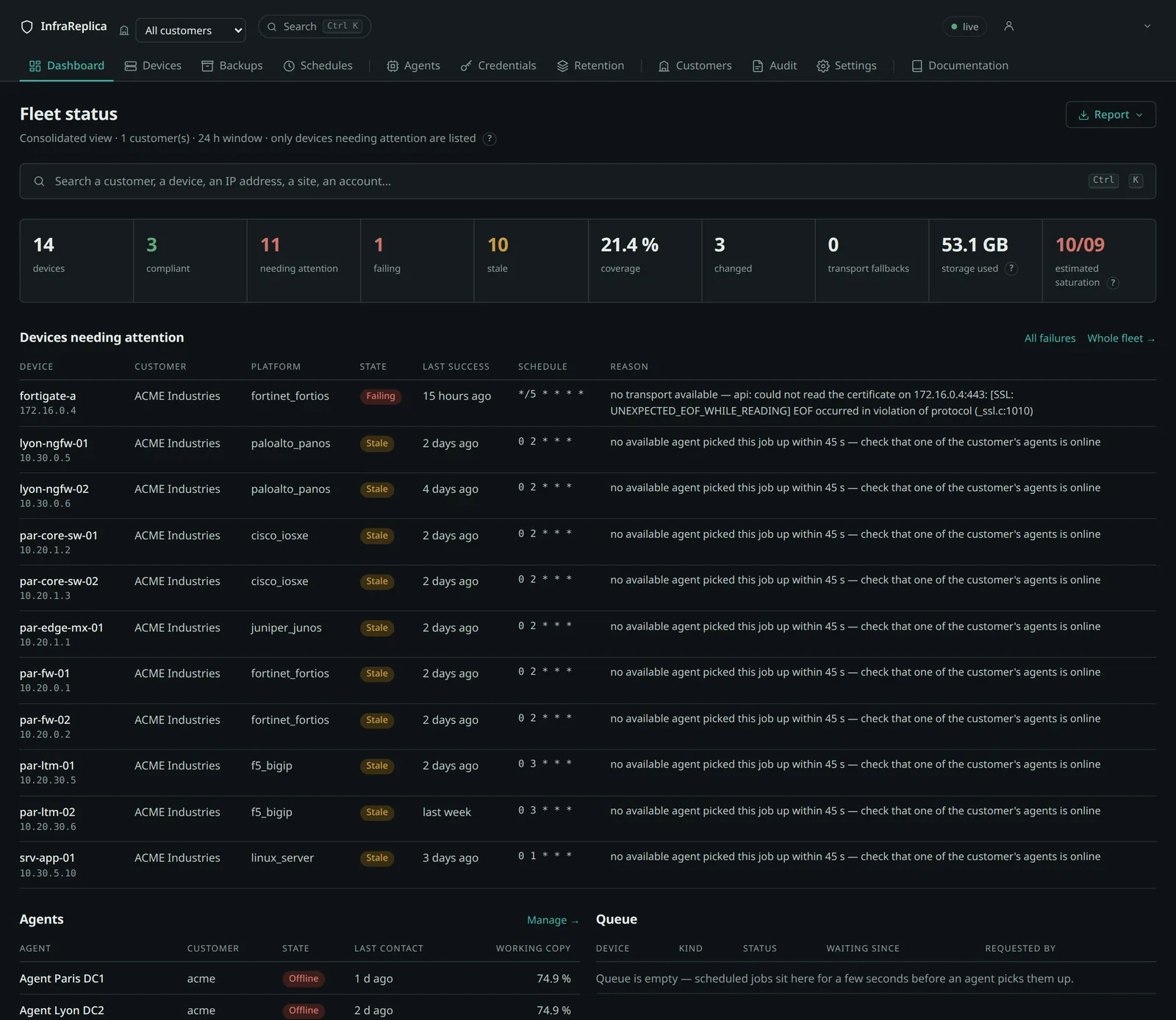
demo seed builds a fleet covering the main platforms, with history, a real
configuration difference, one failing device, one stale, one never backed up and
one scheduled weekly. The production collectors run against captured outputs:
what the interface shows is produced by production code, it is not
simulated.
Worth looking at in particular:
| Where | What it demonstrates |
|---|---|
| Dashboard | the exceptions view: a few lines, not the full inventory |
par-sw-labo |
scheduled on Mondays, backed up three days ago, compliant — it is not stale |
lyon-ngfw-02 |
failing, with the full reason for both transports |
par-fw-02 |
marked “fallback”: the API was unreachable, SSH took over |
par-core-sw-02 → running-config |
comparison of two versions, a real difference |
| Retention | where each field of the cascade comes from |
| Audit | every configuration view recorded |
To go as far as genuinely produced backups without hardware, see lab mode.
Backing up the platform itself
This is the point people discover too late. Three elements, and all three are indispensable:
| Element | Without it |
|---|---|
| The PostgreSQL database | no inventory, no references to the backups |
BKP_MASTER_KEY |
the database is unusable: every customer key is encrypted under it |
| The object store | no backups at all |
The full configuration export completes this: it describes the installation without containing any secret, and can therefore be kept elsewhere — which is what a recovery plan requires.