Scheduling and capacity
Cron expression
A device's schedule is a five-field cron expression:
| Expression | Meaning |
|---|---|
0 2 * * * |
every night at 2 am |
0 3 * * 1 |
every Monday at 3 am |
0 4 1 * * |
on the 1st of every month at 4 am |
*/15 * * * * |
every fifteen minutes |
| (empty) | on demand only |
Five fields, not six or seven. A seven-field expression is refused with an
explicit reason. This is not rigidity: the underlying library happily accepts
* * * * * * * and reads it as every second — a device then set off on every
scheduler cycle, every thirty seconds. The refusal is what saves you from
discovering it through a full disk.
An invalid expression is refused on entry as on import. On import, the device is created with no schedule and the reason appears among the import errors, rather than letting through what the API refuses.
Interface: the Schedules screen, or the field in a device's configuration panel.
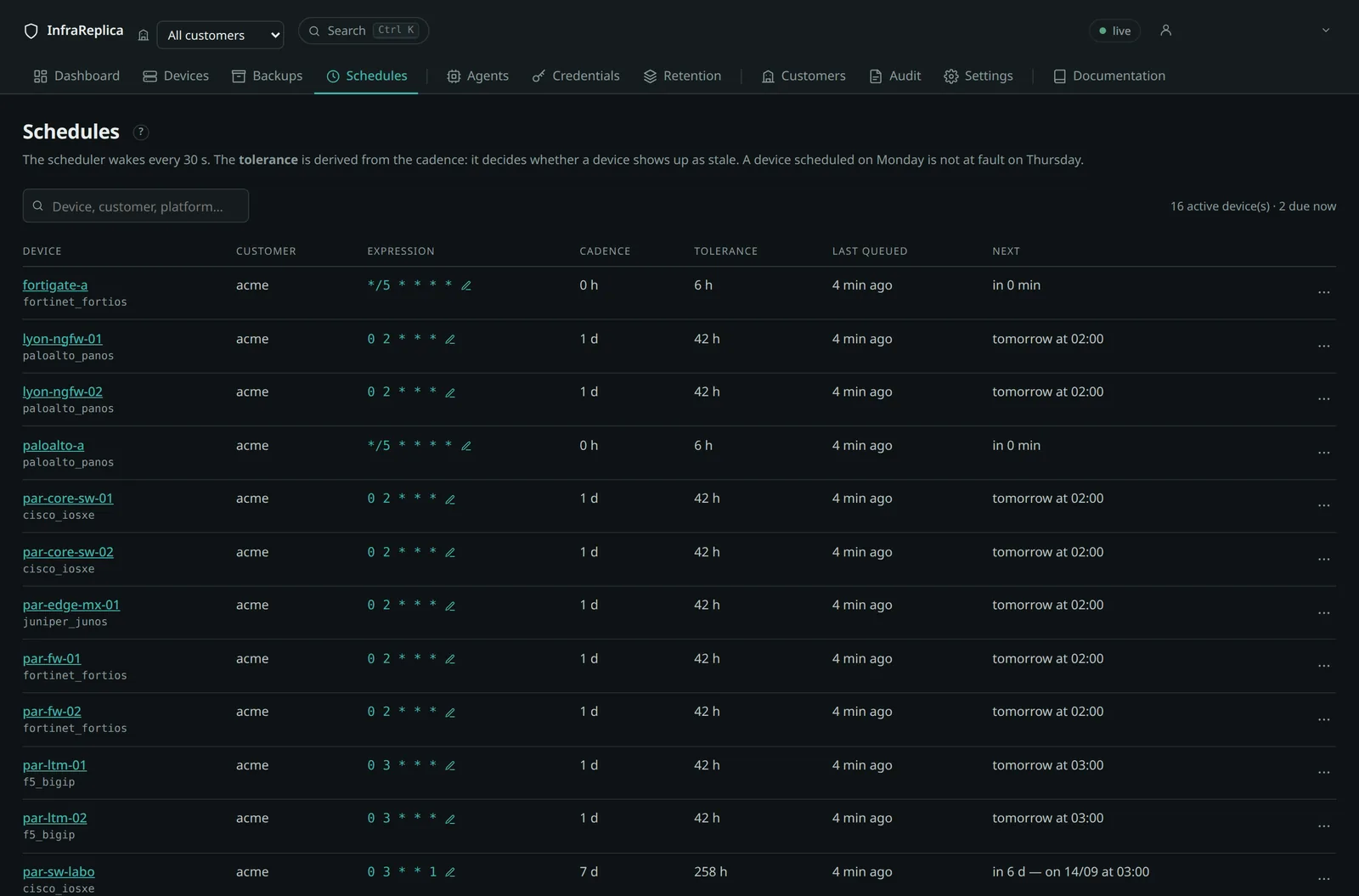
Also via the API.
curl -s -X PATCH "$BASE/api/devices/$DEVICE?tenant=$CUSTOMER" \
  -H "Authorization: Bearer $TOKEN" -H 'Content-Type: application/json' \
  -d '{"schedule":"0 2 * * *"}'

# Remove the schedule: the device only sets off on demand
curl -s -X PATCH "$BASE/api/devices/$DEVICE?tenant=$CUSTOMER" \
  -H "Authorization: Bearer $TOKEN" -H 'Content-Type: application/json' \
  -d '{"schedule":null}'
Which clock the expression is read against
Expressions are read in UTC. 0 2 * * * means two in the morning UTC, not
two in the morning where the device is.
That is a deliberate choice, and it buys two things.
A device in a region without daylight saving keeps the same local backup
time all year: Tokyo is always nine hours ahead, so 17 0 * * * is always
9:17 am there — no drift, ever.
And nothing moves twice a year. Were expressions read in local time, on the last Sunday of March every European device would shift by an hour at the same moment: a fleet of thousands of devices lands on a different load profile overnight, and the spacing you chose between customers is gone. It also removes two awkward corners for free — in UTC there is no hour that fails to exist in spring, and none that happens twice in autumn.
The price is that the wall-clock time you typed is not the wall-clock time
anyone sees, and the day may differ too: 0 2 * * 1 — Monday 2 am UTC —
falls on Sunday at 9 pm in New York. A maintenance window agreed with a
customer as “Monday night” is not Monday night for them.
The preview
Because of that, the schedule editor does not show an hour. It shows the next three real occurrences, with their weekday, in up to four zones:
| Zone | Where it comes from |
|---|---|
| UTC | the expression itself |
| Platform | the platform's own zone, in the settings |
| Customer | the customer's zone, on their page — display only, it changes nothing |
| You | your browser |
A zone that already appeared is not repeated. And where a zone observes daylight saving, the preview says so and gives both readings — “03:00 in winter, 04:00 in summer” — because that difference is otherwise discovered six months later.
Setting a customer's time zone never moves a backup. It changes what the schedules and their reports say, nothing else.
How the scheduler decides
The scheduler runs every thirty seconds (BKP_SCHEDULER_TICK_SECONDS). A device
is due when the next occurrence of its expression, computed from its last
queuing, has passed.
Two useful consequences:
- Never early. A device is never queued before its time. The maximum delay is one cycle, that is thirty seconds.
- One catch-up only. After the platform has been stopped, a late device is queued once, not as many times as it missed occurrences. A daily schedule stopped for five days does not produce five backups at restart.
A job already pending for a device does not generate a second one.
Staleness tolerance
This is the point that answers the most frequent question:
Why is this device “stale” when it was not scheduled today?
It should not be. A device's state is computed from its expected cadence, never from today's calendar. A device scheduled on Mondays and looked at on Thursday is compliant: the report shows its last successful backup and its age — “3 days ago”.
The cadence is deduced from the expression: the platform unrolls six occurrences and takes the median of the intervals, which stays right for irregular expressions of the “on the 1st and the 15th” kind.
The tolerance follows from it:
A daily backup slipping by an hour therefore does not raise an alert; three days of silence on a daily device does.
| Case | Cadence | Tolerance |
|---|---|---|
0 2 * * * (daily) |
24 h | 42 h |
0 3 * * 1 (weekly) |
7 d | ~10.5 d |
| no schedule | 24 h by default | 42 h |
Forcing a tolerance. A device's “Staleness tolerance” field replaces that computation with a value in hours. Useful for a device whose backup is slow, or whose maintenance window is wide.
If a device has neither a usable schedule nor a tolerance of its own, the global
default_staleness_hours setting (36 h by default) applies.
The possible states
| State | Condition | Severity |
|---|---|---|
| Compliant | last success within tolerance, last run not a failure | — |
| Stale | last success older than the tolerance | medium |
| Never backed up | no success since it was declared | medium |
| Failing | the last run failed | high |
The order of the rules matters: a failure on the last run takes precedence over everything, because it is the actionable information. Next comes the total absence of any backup, then staleness.
A device unreachable for three weeks therefore never shows as “no change”: that is precisely the silent failure mode this distinction avoids.
Capacity estimate
At the moment you enter a schedule, the platform says what it will cost. No more discovering the volume six months later.
Three figures, of different natures, which must not be confused:
| Figure | Where | Nature |
|---|---|---|
| Agent working copy | agent page and agent list | the current state of the backed-up paths, one version only — a cache, rebuildable |
| Occupied in storage | customer page, dashboard | every version kept, deduplicated, encrypted, under lock — the only measure of what the backups cost |
| Projection | scheduling panel, customer page | an estimate, whose basis is always stated |
What is measured
A daily sample walks the storage and records, per customer and consolidated, the bytes occupied and the number of objects. The consolidated sample covers the whole bucket: orphan prefixes — a customer recreated, leftovers from tests — count there, and in no customer.
A sample is taken at startup if the last one is more than twenty hours old. The Sample button on the customer page forces one.
Also via the API.
What is estimated
The trend is the slope of the samples over the last thirty days, as soon as two samples at least six hours apart exist. Failing that, it falls back on the transfers of the last seven days, corrected by the stored/transferred ratio observed at that customer.
That ratio is no detail: measured on a real customer, 131 GB transferred for
48.6 GB stored. Compression and deduplication apply after the transfer; an
estimate based on raw transferred bytes would overstate by 170%. The basis used —
measured, transferred or insufficient — is always displayed.
The projection at scheduling time multiplies the average volume per run by the number of runs per month deduced from the expression. A device's first snapshot is left out of the computation: it is the initial transfer, and it is not representative.
Two figures are given:
- the raw figure at 1, 6 and 12 months, with no purge;
- the steady state once the effective retention is applied.
The steady state is an upper bound: calendar retentions are counted on top of the versions kept.
Also via the API.
# Projection for the device's current schedule
curl -s "$BASE/api/storage/estimate?device_id=$DEVICE&tenant=$CUSTOMER" \
  -H "Authorization: Bearer $TOKEN"

# Projection for a schedule being considered, without setting it
curl -s -G "$BASE/api/storage/estimate" \
  --data-urlencode "device_id=$DEVICE" \
  --data-urlencode "tenant=$CUSTOMER" \
  --data-urlencode "schedule=*/15 * * * *" \
  -H "Authorization: Bearer $TOKEN"
Limits, acknowledged
- Two backups are needed for an estimate, and a few days for a trend. Below
that, the answer is
insufficientand the screen says so rather than showing an invented figure. - The object lock delays the return of space. Between the raw figure and the steady state lies at least the lock's floor duration, during which nothing comes back down, even after retentions expire. See Retention.
- A series too dense and too short feeds no trend. A
* * * * *schedule tried out over an afternoon would say anything at all about a month: it is left out.
Estimated saturation
The dashboard displays a saturation date when it falls less than ninety days away, in red below thirty. Free space comes from the storage administration API; if that is unreachable, the projection is absent rather than wrong.