Agents
An agent is a container deployed inside a customer's network. It is the one that reaches the devices: the platform never reaches them directly.
Why an agent
Three reasons, in that order of importance:
- No inbound flow. The agent opens an outbound connection to the platform and keeps it open. Nothing to open on the customer firewall, no address to expose.
- Devices are not routable from the provider. A customer management network is rarely reachable from outside, and that is exactly as it should be.
- Data does not pass through the platform. The agent collects, then deposits straight into the object store. The platform stays sized for jobs, not for terabytes.
An agent serves one customer, permanently
The customer is chosen at declaration and is never changed. No endpoint
allows it; the API answers 405 to any attempt to modify it.
To reassign a machine to another customer: revoke the agent — its certificate stops being accepted immediately — delete it, then declare a new one. The history of the runs it executed remains, with no agent attached.
This is not administrative red tape. An agent carries a certificate authorising it to receive a given customer's administration credentials, and to write into its repository. Moving that attachment would amount to giving a machine already in place access to another customer's secrets, without reissuing anything.
Enrolment
Enrolment exchanges a single-use token for an mTLS client certificate. It happens in two stages, in two different places.
1. Declare the agent (platform side)
Interface: Agents → + Agent. The customer is mandatory; for a new customer, the “+ New customer…” option creates it in the same panel. Ticking “Issue an enrolment token straight away” saves a round trip.
Command line:
backup agent create acme agent-paris --name "Agent Paris DC1"
backup agent token acme agent-paris     # the token is shown once only
Also via the API.
The token is returned in clear only on this call. Only its fingerprint is kept: it cannot be read back afterwards.# Declare curl -s -X POST "$BASE/api/agents?tenant=$CUSTOMER" \ -H "Authorization: Bearer $TOKEN" -H 'Content-Type: application/json' \ -d '{"slug":"agent-paris","name":"Agent Paris DC1"}' # Issue an enrolment token (valid 60 min by default) curl -s -X POST "$BASE/api/agents/$AGENT/enrollment-token?tenant=$CUSTOMER" \ -H "Authorization: Bearer $TOKEN"
2. Enrol the agent (customer side)
The agent needs two things: the token, and the platform's certificate authority.
# On the platform, fetch the authority
backup pki ca > ca.crt

# On the agent machine
backup-agent enroll --token <token> --ca ca.crt
backup-agent run
The authority is mandatory. Without it the agent would send its token — the only secret it holds — to a server whose identity it has not verified. The platform refuses enrolment rather than accept an unauthenticated connection.
In a container:
docker compose exec -T platform backup pki ca > pki/ca.crt
docker compose run --rm agent backup-agent enroll --token <token> --ca /ca/ca.crt
docker compose --profile agent up -d agent
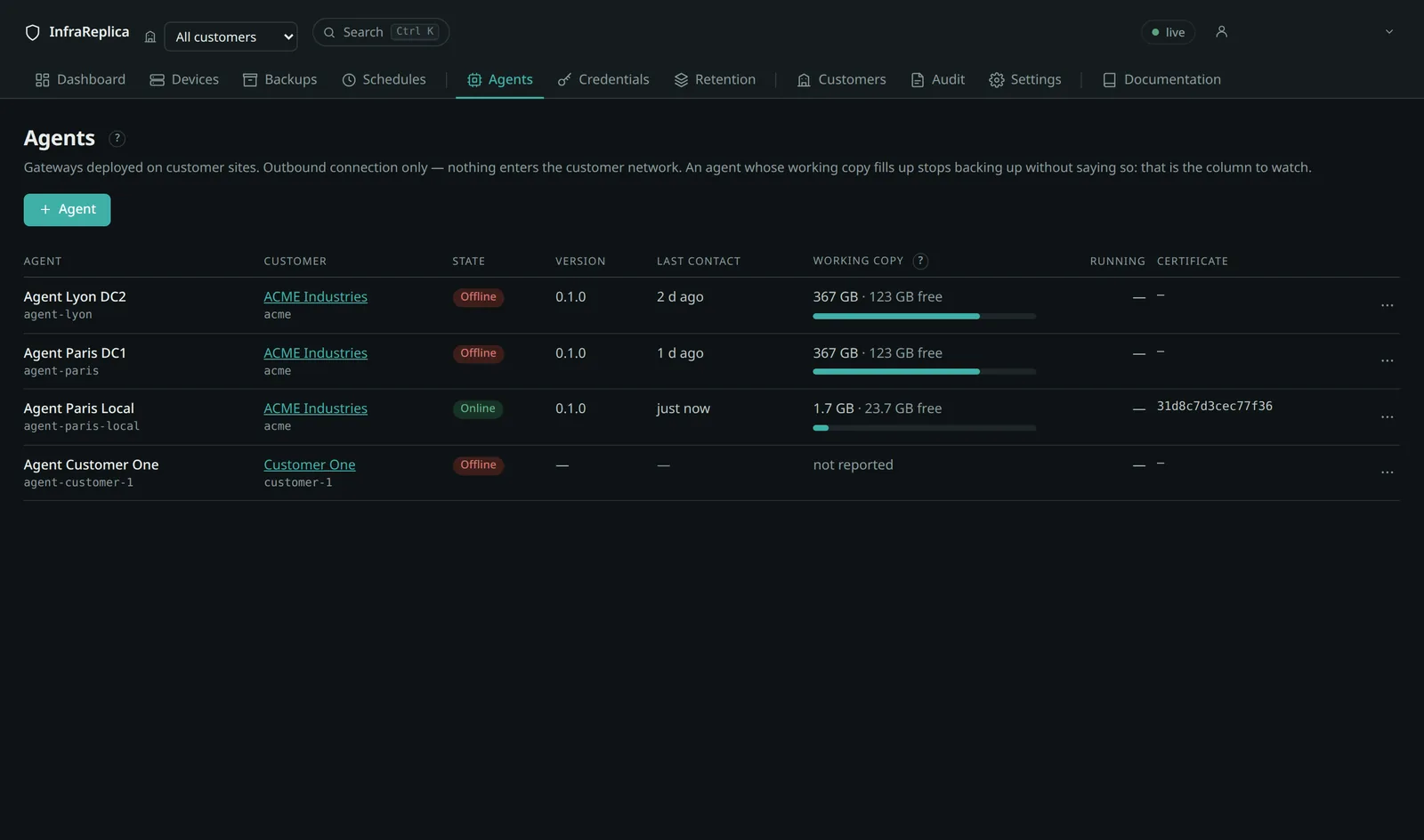
The agent then shows as “online” on the Agents screen, with its version and its working copy usage.
Two listeners, and why
| Port | Protocol | What goes through it |
|---|---|---|
9443 |
gRPC mTLS — client certificate required | jobs, hence device access credentials |
9444 |
gRPC, server TLS only | enrolment, and nothing else |
An agent enrolling has no certificate yet: demanding mutual authentication on that one call would be impossible. Rather than lowering the requirement everywhere, enrolment gets its own listener, bounded by a single-use, short-lived token.
BKP_GRPC_SERVER_NAMES lists the names under which agents reach the platform.
They are carried as SANs of the server certificate: an agent reaching the
platform under a name absent from that list fails TLS verification. It is the
most frequent cause of an enrolment that refuses to complete.
Agent state
| State | Meaning |
|---|---|
| Online | seen less than BKP_AGENT_OFFLINE_AFTER_MINUTES ago (15 min by default) |
| Offline | silent beyond that delay |
| Revoked | its certificate is no longer accepted |
An offline agent does not block immediately: jobs stay queued. They turn
abandoned after BKP_RUN_ABANDON_AFTER_MINUTES (180 min) for a scheduled job,
and after BKP_MANUAL_RUN_ABANDON_SECONDS (45 s) for one requested by hand —
somebody is waiting in front of a screen, and a queue that stays “queued” with no
explanation is worse than an outright failure.
Versions, and how long an old agent keeps working
Platform and agents are published together and carry the same version number. That does not mean they must be upgraded on the same day: an agent sits inside a customer's network, and nobody will visit every site the afternoon the platform moves.
The agent list shows the version each one reports at every connection. That column is how you watch the fleet age.
| Change | Agents already deployed |
|---|---|
Patch release, 1.4.0 → 1.4.1 |
unaffected; the protocol does not change |
Minor release, 1.4.0 → 1.5.0 |
the two previous minor versions keep working |
Major release, 1.x → 2.0 |
may break; the release notes say so, and both sides are upgraded together |
Upgrade agents anyway. An agent that lags collects the platform's fixes late, and an agent two minor versions behind is outside the window: it may keep working, and it may stop without a useful message. The release notes for each version state the window that applies to it.
The working copy
This is the column to watch. For Linux servers the agent keeps an rsync copy of the backed-up paths; its persistence is what makes the transfer incremental. An agent whose disk fills up stops backing up, and does so quietly.
The usage reported is the real size of that copy, not that of the volume hosting it; the capacity shown is the copy plus free space. The measurement is refreshed at most every five minutes, and immediately at the end of every job.
If the transferred share does not decrease from one snapshot to the next, the
copy is not persisting: check that /var/lib/backupmssp/staging is indeed
mounted on a volume.
Agent directories
The agent runs unprivileged. Everything it writes lives under a single tree, which belongs to it:
| Path | Purpose | Mount on a volume |
|---|---|---|
/var/lib/backupmssp/staging |
rsync working copy | yes — its persistence makes the transfer incremental |
/var/lib/backupmssp/cache |
Kopia cache | recommended — rebuildable, but losing it costs a full re-read |
/var/lib/backupmssp/kopia |
repository configuration | no |
/var/lib/backupmssp/work |
working directory for a run | no — cleaned after every job |
/etc/backupmssp/pki |
agent key and certificate | yes — otherwise it must be re-enrolled at every restart |
The Kopia cache is placed here deliberately, not under /var/cache, which
belongs to root: an unprivileged agent cannot write there, and the failure only
surfaces when creating the repository — after a connection and a transfer that
both succeeded, which makes the diagnosis puzzling.
Revoking and deleting
Interface: the row menu on Agents, or the agent page.
# Revocation: the certificate stops being accepted, immediately
curl -s -X POST "$BASE/api/agents/$AGENT/revoke?tenant=$CUSTOMER" \
  -H "Authorization: Bearer $TOKEN"

# Deletion: refused (409) until the agent is revoked
curl -s -X DELETE "$BASE/api/agents/$AGENT?tenant=$CUSTOMER" \
  -H "Authorization: Bearer $TOKEN"
Deletion removes device attachments and enrolment tokens. Executed runs remain, with no agent: operational history is not configuration data, and it is not erased by removing a machine.
Lab mode
BKP_AGENT_REPLAY_FIXTURES makes the agent talk to captured outputs instead of
real devices. Everything else is production code: queue, gRPC over mTLS,
collectors, normalisation, fingerprints, Kopia repository, reporting and
ingestion. Only the dialogue with the device is replayed.
That is what makes it possible to prove the chain end to end without hardware.
It is disabled by default, and must stay so. An agent in lab mode produces
backups that correspond to no real device. The agent refuses to enable this mode
outside a dev, test or lab environment.
An agent in that state is flagged everywhere: red banner at the top of every
screen, a pill in the agent list, a lab_mode marker in the JSON reports.
Without it, a green dashboard would suggest the fleet is protected while the
devices were never reached.
The symptom of an oversight is an error of this kind:
The agent is looking for a capture because it is in lab mode, when it was expected to reach a real server.
What you then observe, end to end:
| Step | Expected result |
|---|---|
| Connection test on a Cisco | established over ssh |
| Test on a Fortinet or an F5 | established over api — their preferred transport |
| Backup of a Cisco | several artifacts, fingerprints computed after normalisation |
| Second backup | unchanged, no version added |
| Test on a device with no online agent | refused immediately, with the reason |
| Manual backup with no agent | fails after the delay, never “queued” indefinitely |